We have not tested a memory card and will not pretend otherwise. What follows sets what Nintendo publishes about its own console against what the SD Association publishes about the standard, because this is one of the few accessory decisions where both sides are written down by the parties responsible. A claim appears below only if it is stated on Nintendo’s support or specification pages or on the SD Association’s standard pages, read on October 12, 2026.
The question keeps getting asked because the answer broke a decade of habit. From 2017 onward a Nintendo handheld took the same microSD card as a dash cam, and the only real decision was capacity. Switch 2 moved storage onto a bus that did not exist when the first Switch launched. Our earlier look at how console prices moved in 2026 covers the hardware side of the same squeeze.
Trend Signal
78/100 Strong momentum
- Emerging
- Rising
- Mainstream
- Peaking
- Cooling
A mandatory accessory arrived with the console and the labels are still new
Nintendo states that Nintendo Switch 2 is only compatible with microSD Express cards, up to 2TB. The SD Association rates SD Express at 985MB/s on a single PCIe Gen 3 lane, against 104MB/s for the fastest conventional microSD mode.
Our editorial reading of the cited data, not a forecast. How it is scored
By the numbers
- 2TBMaximum microSD Express capacity Nintendo Switch 2 supports, per Nintendo supportNintendo
- 985MB/sSD Express rate on one PCIe Gen 3 lane, SD specification 7.00 and 7.10 for microSDSD Association
- 104MB/sFastest conventional microSD bus mode, UHS-I SDR104, per the SD AssociationSD Association
- 256 GBInternal storage on Nintendo Switch 2, with part reserved for the systemNintendo
Why a card from the first Switch cannot store a game
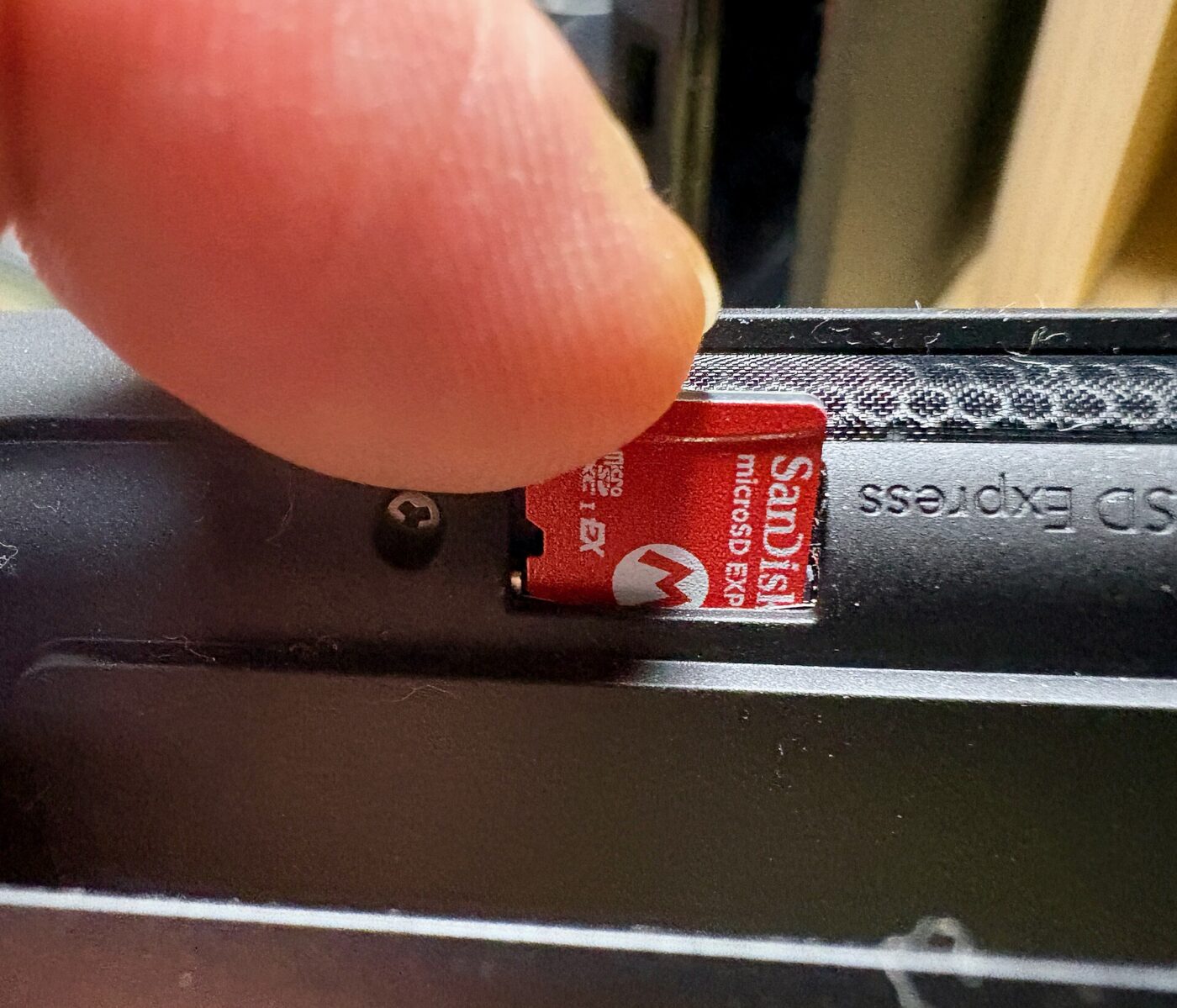
Nintendo’s compatibility article states the rule in one line: Nintendo Switch 2 is only compatible with microSD Express cards. A card carried over from the first Switch, in Nintendo’s wording, will not allow you to save or load digital games or save data. What it can still do is narrow: screenshots and videos captured on a Nintendo Switch can be loaded from it.
A second Nintendo page states the same rule from the other side. Only microSD Express cards can be used to save game data, in-game screenshots and videos on Switch 2, and microSD cards cannot be used with the console for any other purpose. Any card up to 2 TB meeting the microSD Express standard qualifies. Nintendo also says an internet connection is needed to install a system update the first time an Express card is used, so the card is not a drop-in on an offline console.
The old card is not slow on Switch 2. It is excluded, and Nintendo says so in plain terms.
What the Express in the name changes
The SD Association publishes one table of bus modes, and it shows why Express is a break rather than a step. Default Speed is 12.5MB/s and dates to SD 1.0. High Speed is 25MB/s. UHS-I covers 50MB/s in SDR50 and DDR50 and 104MB/s in SDR104 on one row of pins. UHS-II adds a second row for 312MB/s half duplex. SD Express starts above all of it at 985MB/s on one PCIe Gen 3 lane, listed under specification 7.00, and 7.10 for the microSD form factor.
The jump is a change of plumbing. The association says SD Express offers the fastest data transfer rates up to 3940MB/s using the PCIe Gen 4 interface and the NVMe application protocol, the same protocol stack a laptop SSD speaks, and a footnote adds that version 8.00 microSD supports only PCIe Gen 4 by one lane. It also publishes the caveat that matters when reading any listing: maximum speed differs from the bus interface speed and depends on the card. A 985MB/s figure describes the road, not the vehicle.
| Bus mode | Published maximum rate | SD specification |
|---|---|---|
| High Speed | 25MB/s | 1.10 |
| UHS-I, SDR104 | 104MB/s | 3.01 |
| UHS-II | 312MB/s half duplex | 4.00 |
| SD Express, PCIe Gen 3 by one lane | 985MB/s | 7.00, and 7.10 for microSD |
| SD Express, PCIe Gen 4 by one lane | 1970MB/s | 8.00 |
The marks that matter, and the ones that do not apply

Nintendo names the mark to look for: the microSD EX symbol. That piece of silk-screen corresponds to the compatibility rule, and it is worth more than any megabytes-per-second claim printed beside it.
The SD Association’s speed-class page carries grades built for this bus. SD Express Speed Classes are E150, E300, E450 and E600, applied to the SD Express bus interface family, used with NVMe, supporting multi-stream access and including power and thermal management. The older grades belong to older buses on the same page: Class 10 is used in High Speed mode or faster, UHS Speed Class 1 and 3 in SDR50 or DDR50 or faster, V30 within the UHS family, V60 and V90 in UHS-II or faster. A label led by V30 or U3 is describing the conventional interface. The association even warns that a Class 10 host and a U1 card are not equivalent although both are indicated at the same 10MB/sec write speed.
Capacity, and what the console already gives you
Nintendo’s technical specifications list 256 GB of UFS storage inside Switch 2, with a portion reserved for use by the system. That is what a card is added to, not what it replaces, which is why the question arrives in 256 GB, 512 GB and 1 TB steps.
Nintendo’s accessory page shows how the company expects it to be solved. Alongside the Dock Set, the Pro Controller and the Joy-Con 2 Charging Grip it lists a Samsung microSD Express Card at 256GB for Nintendo Switch 2. A console maker putting a third-party card in its own lineup is a signal about supply. On cost we will not type a store price: the direction of flash pricing is in our memory card price trail and the memory squeeze behind it in what happened to RAM prices.
Decide capacity against 256 GB of internal storage, then let the EX mark decide the rest.
Readers, old hosts and the slow-card confusion
The second query in this cluster is about readers, and the standard answers it. The SD Association states that the first row of pins on UHS-II and SD Express cards provide backward compatibility and interoperability with conventional interface host devices. An Express card in an ordinary reader is not inert; it talks over the old interface, which the association caps at 104MB/s in SDR104. A genuine card can therefore look unremarkable in an old reader with nothing wrong at either end.
Nothing on a card’s face is a guarantee of anything. What the marks do is narrow the question from a vague speed claim to a format claim that Nintendo and the SD Association have both defined in writing. More context sits in our gaming and entertainment coverage, and how we weigh evidence is in how we track trends.
What to watch next
- Whether the SD Association adds microSD entries above 1970MB/s to its bus-speed table, which would signal PCIe Gen 4 by two lanes reaching the small form factor.
- Whether Nintendo’s accessory page adds licensed Express cards above 256GB, the clearest sign of supply loosening.
- Whether listings start quoting E150 to E600 classes instead of V30, which is when the labels will match the bus.
Where to start
Paid links: we earn a commission if you buy through the buttons below, at no extra cost to you. As an Amazon Associate I earn from qualifying purchases.
microSD Express buying decisions compared on what the labels state
| Product type | Good fit for | Where to look |
|---|---|---|
| microSD Express card for Nintendo Switch 2 | Fits a first card for Switch 2 | See listings on AmazonOpens Amazon search results, not one listing: check the model on the product page. |
| 1TB microSD Express card | Fits a large game library | See listings on AmazonOpens Amazon search results, not one listing: check the model on the product page. |
| Card reader with SD Express support | Fits moving captures to a PC | See listings on AmazonOpens Amazon search results, not one listing: check the model on the product page. |
Product types that fit the trend described above, not tested models. Check the exact listing before you buy. How we pick them.
microSD Express card for Nintendo Switch 2
Where to look: Amazon
The baseline buy. Nintendo states the console is compatible with microSD Express cards only, so the format claim is the decision and the EX symbol is how it is verified.
- Format matches Nintendo’s stated rule
- Sold in Nintendo’s own accessory lineup
- Capacity fills fast beside 256 GB internal
- Needs a system update on first use
Card reader with SD Express support
Where to look: Amazon
Only worth it if the reader states Express support. The SD Association says the first row of pins keeps an Express card working in a conventional host, which is why an old reader looks slow rather than broken.
- Express readers use the PCIe and NVMe path
- Avoids the conventional interface ceiling
- Most readers on sale are UHS-I only
- Express support is often unstated
More: Gaming and Entertainment trends and how the Trend Signal is scored.
Sources
- microSD card and microSD Express card compatibility with Nintendo Switch 2 — Nintendo Support
- microSD Express cards on Nintendo Switch 2 — Nintendo Support
- Bus Speed, Default Speed, High Speed, UHS and SD Express — SD Association
- SD Standard Overview, pin counts and backward compatibility — SD Association
- Speed Class, UHS Speed Class, Video Speed Class and SD Express Speed Class — SD Association
- Nintendo Switch 2 technical specifications — Nintendo
- Nintendo Switch 2 accessories — Nintendo
Questions readers ask
Will my old Switch microSD card work in Switch 2?
Not for games. Nintendo states that Nintendo Switch 2 is only compatible with microSD Express cards, and that a card used in a Switch will not allow you to save or load digital games or save data. Screenshots and videos captured on a Switch can still be loaded from it.
What is the largest card Switch 2 supports?
Nintendo says microSD Express cards with a capacity of up to 2TB are supported, and that any card up to 2 TB meeting the microSD Express standard can be used.
How much faster is microSD Express?
The SD Association rates SD Express at 985MB/s on one PCIe Gen 3 lane, 1970MB/s under specification 8.00 and up to 3940MB/s using PCIe Gen 4 with NVMe. The fastest conventional microSD mode it lists is 104MB/s in UHS-I SDR104, and it notes card performance rather than the bus figure decides the real rate.
Does an Express card work in an old reader?
The SD Association states that the first row of pins on UHS-II and SD Express cards provide backward compatibility and interoperability with conventional interface host devices, so the card works over the older interface at that interface’s published ceiling.